Two Smatfarm reef LED fixtures, same model, touch panels both dead on arrival of the fault – the capacitive panel itself stopped responding while the rest of each fixture (remote control, 2.4GHz master/slave group sync) kept working fine. Rather than replace the panels, which are a known weak point near saltwater (salt creep/humidity getting into the sensor or its connector), the plan became: identify the microcontroller, pull the firmware, and patch in a UART command interface so an external controller (ESP32) can drive the fixture directly, bypassing the dead touch input entirely.
This page documents the process as it actually happened, including the parts that didn't work on the first try.
Opening the fixture and inspecting the mainboard under a loupe identified the main chip: a GigaDevice GD32F130C8T6 – an ARM Cortex-M3, pin/peripheral compatible with STM32F0/F1, 64KB flash, 8KB SRAM, LQFP-48 package. The board also had two labeled debug headers sitting right next to each other, which made everything that followed possible without blind probing:
UART1:  V  T  R  G
SWD1:   V  G  D  C
V = supply sense, G = ground, T/R = UART TX/RX, D/C = SWDIO/SWCLK.
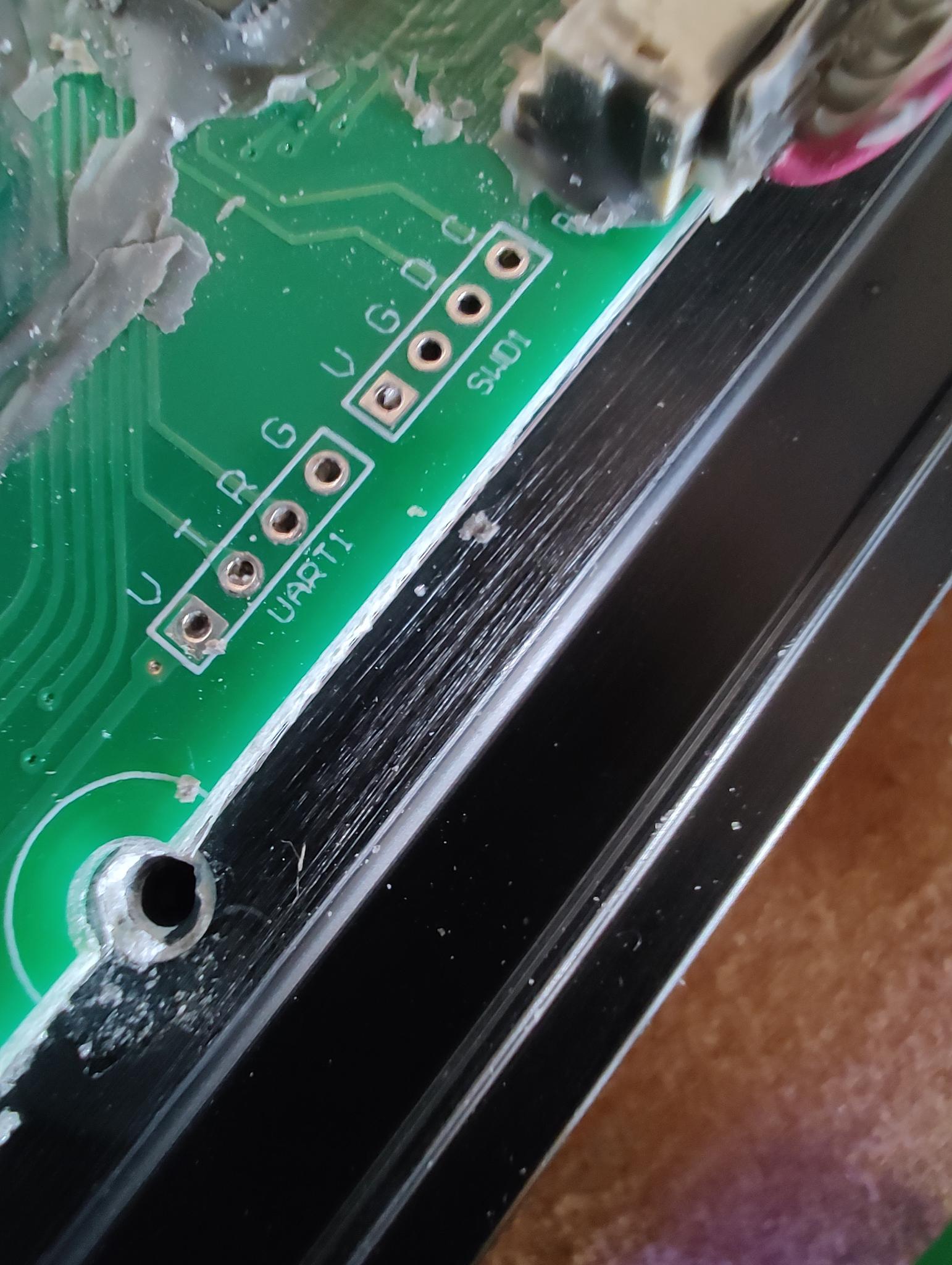
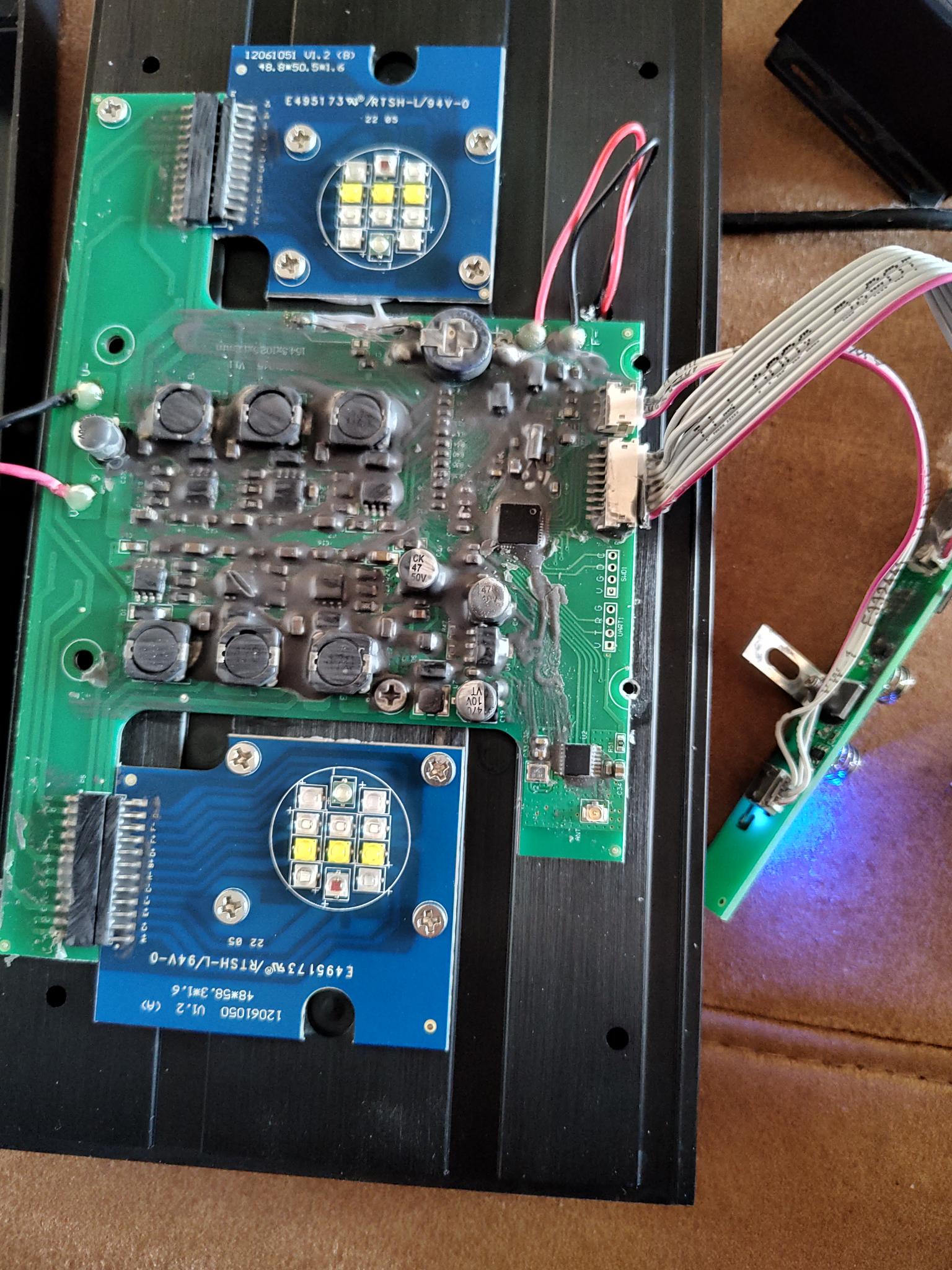
Left: the two headers as labeled on the silkscreen. Right: the full mainboard – six driver inductors (two rows of three, one per LED channel) confirm the 6-channel design found later in firmware; the small QFN chip near the headers is the GD32F130C8T6 itself.
A 3.3V USB-to-serial adapter on the UART1 header (115200 baud) immediately showed a boot banner:
Software Ver3.0
Mar 29 2022  09:16:37
-------------
Task CheckSelf...
Task Work...
followed by a continuous idle-loop counter (IDLE:1, IDLE:2, ...). This confirmed the MCU boots normally and the firmware runs an RTOS-style task scheduler – useful context, but also a dead end for interactivity: sending any input back over this UART (newline, help, ?, AT) produced zero reaction. This console is transmit-only logging, not a command shell.
A controlled test – watch the idle counter for 10 seconds untouched, then press the touch panel once – produced no visible change in the log at all. Combined with the one-way UART, this ruled out a quick software fix and confirmed the problem needed a hardware-level bypass, not a firmware setting.
The SWD1 header gives direct debug access to the chip. A CH347-based USB debug probe (set to JTAG/SWD mode via its onboard DIP switch) can drive this, but needs OpenOCD built with CH347 support – that driver only exists in OpenOCD's development branch, not yet in any tagged release, so the distro-packaged version doesn't have it:
git clone --depth 1 https://github.com/openocd-org/openocd.git
cd openocd
git submodule update --init --recursive
./bootstrap
./configure --enable-ch347 --enable-internal-jimtcl
make -j$(nproc)
With that built, a plain SWD connection using the generic stm32f1x.cfg target (GD32F1x0 is pin/peripheral compatible) worked immediately:
openocd -c "adapter driver ch347" -c "transport select swd" \
  -f target/stm32f1x.cfg -c init -c "reset halt" \
  -c "dump_image smatfarm_dump.bin 0x08000000 0x10000"
65536 bytes out, verified as a legitimate ARM Cortex-M image (correct vector table: reset handler, NMI, HardFault, SVCall, PendSV all pointing at sensible addresses). This dump became the safety net for everything that followed – every later step could be undone by reflashing it.
Static disassembly (arm-none-eabi-objdump) combined with scanning the binary for known peripheral base addresses (GPIO, ADC, TIMER, USART – all confirmed against GigaDevice's own register definitions, not guessed) located the relevant code. The single most useful technique turned out to be empirical rather than static: setting a hardware watchpoint over the live SWD connection on the ADC result register and literally watching which function touched it:
openocd ... -c "halt" -c "wp 0x4001242c 4 r" -c "resume" \
  -c "sleep 5000" -c "halt" -c "reg pc" -c "reg lr"
That led to a clean, self-contained function: a loop over 6 channels, each compared against a fixed threshold, setting a "touched" flag if any channel crossed it. A nearby 6-byte buffer in RAM (0x20000068) holds the live per-channel brightness values that the rest of the firmware (PWM output, 2.4GHz sync) reads from.
Rather than build a parallel control path, the dead touch-detection function (124 bytes, clean entry/exit) gets overwritten in place with a small UART command parser. Three real bugs surfaced during testing, each worth recording since none were obvious from the datasheet alone:
- Wrong data register. The USART has separate receive and transmit data registers (
USART_RDATA at offset 0x24, USART_TDATA at offset 0x28) – not one shared register as assumed from modeling the read path on the firmware's own (write-only) logging code. Reading from TDATA instead of RDATA silently returns stale transmit-buffer content, never the actual received byte.
- RX was configured for DMA, not polling.
USART_CTL2 had both DENR (DMA for reception) and DENT (DMA for transmission) set. With DENR active, a DMA controller silently consumes every received byte – and clears the RXNE flag – before a polling loop ever gets a chance to see it. The fix clears DENR every call (idempotent, no init-order dependency) while leaving DENT alone so the existing TX logging keeps working.
- A hidden schedule-override flag. Writing the right value to the right buffer still didn't stick – a separate time-of-day scheduler (sunrise/sunset/moon ramps) was recomputing and overwriting it every cycle. Tracing the scheduler's caller found a mode byte that gates whether it runs at all: values 0/2/3 let it recompute, anything else skips it. The patch sets this to a non-scheduled value after every manual write, so the schedule leaves manual values alone until... TBD whether/how to hand control back; see Status.
void uart_cmd_poll(void) {
    USART0_CTL2 &= ~DENR_BIT;                 // idempotent DMA-RX disable
    if (!(USART0_STAT & RXNE_BIT)) return;
    uint8_t b = (uint8_t)USART0_RDATA;          // RDATA, not TDATA
    if (b >= 0xA0 && b <= 0xA5) {
        pending_channel = b - 0xA0;
        awaiting_value = 1;                      // self-healing: always resets state
    } else if (awaiting_value == 1) {
        CHANNEL_BUF[pending_channel] = b;         // target/setpoint buffer, not the
        awaiting_value = 0;                        // ramping "current value" buffer
        SCHEDULE_MODE = MANUAL_MODE_VALUE;          // stop the scheduler overwriting it
    }
}
Compiled and linked directly at the target addresses (0x08000678 for the code, RAM at 0x20001ff8 for the state bytes), it comes out to 88 bytes, inside the 124-byte budget, remainder NOP-padded. One more lesson from testing: these manually-placed RAM variables sit outside the firmware's own .bss layout, so they're never zero-initialized on reset – the logic above is deliberately written to self-heal from garbage starting values rather than assume a clean 0 start.
This is the part that didn't go smoothly. The patched image verified correctly against the original byte-for-byte outside the intended 114-byte change window, but flashing it hit a genuine, documented hardware bug: CH347T firmware 4.41 erroneously drives SWDIO high for 392ns after the last ACK bit when reading AP registers – which happens constantly during flash programming (status polling). That causes brief bus contention with the target and corrupts data with parity errors.
In practice this showed up as roughly a 50% failure rate on flash write operations – sometimes a write/verify completed cleanly, sometimes it timed out and left flash erased (blank, including the vector table, until reflashed). Every failure was recoverable from the firmware backup, but it made the process unreliable enough to be worth fixing properly rather than repeatedly retrying:
Adapter D (SWDIO) ---/\/\/\--- Target SWDIO
                     330 ohm (220-470 ohm range)
A single series resistor (220–470Ω) inserted inline in the SWDIO wire limits the current during that contention window enough for the line to settle to a valid level instead of a corrupted one, without materially slowing down normal SWD transactions at these clock speeds.
Patched, flashed, and confirmed working. Sending 0xA0–0xA5 (select channel) followed by a value byte over UART at 115200 baud sets that channel's brightness directly, and it holds – survives the scheduler's recompute cycle, doesn't revert, doesn't need repeating. Turning individual channels and all six off was confirmed, as was setting a specific mid-range brightness and having it stick.
One debugging note worth recording since it cost real time: several "the fix doesn't work" results late in testing turned out to be a 9600-vs-115200 baud mismatch on the test side (the serial port had silently reset to its default after a USB replug), not a firmware problem at all – worth checking before suspecting the chip when a previously-working command stops responding.
Flashing the GD32F130 over SWD via the CH347 adapter remains unreliable (the v4.41 firmware bug above, the SWDIO resistor mitigates but doesn't fully eliminate it) – budget for a few retries per flash, with the firmware backup as the safety net, same as throughout this project.
Remaining work is entirely on the ESP32 side now: implementing the same simple protocol (two bytes per command, 115200 baud) from a microcontroller instead of a test terminal, plus whatever UI (web page, Home-Assistant-style dashboard, physical buttons) replaces the dead touch panel for day-to-day use. The firmware side of this project is done.
One real limitation worth knowing before building on this: the protocol has no acknowledgment or retry, and the USART's hardware receive buffer holds exactly one byte. Sending several channel commands back-to-back with short gaps (under roughly half a second) occasionally drops a byte – confirmed directly: a 6-channel sequence sent with 0.5s gaps intermittently missed some channels on both an on-sequence and a following off-sequence, while the identical sequence sent with 2-second gaps was reliable every time. Workable for manual/occasional control as-is; anything sending commands rapidly (the planned ESP32 firmware included) should either pace sends with a deliberate gap or add a simple ack-and-retry on top of the two-byte protocol rather than assume delivery.
The patch source, the linker script, and a script that splices the compiled patch into your own firmware dump. Deliberately not a pre-patched firmware binary – the dump is Smatfarm/GigaDevice's own compiled firmware, not something this site has the right to redistribute. Dump your own fixture's flash (steps below) and run the apply-script against it instead.
- uart_patch.c – the patch source shown above
- patch.ld – linker script that places it at the exact target addresses
- apply_patch.py – splices the compiled patch into your firmware dump and NOP-pads the remainder
Written for someone with basic Linux command-line familiarity, repeating a dead touch panel on their own Smatfarm fixture (or genuinely identical chip/firmware – check your own boot banner's version string first). Needs: a CH347-based USB debug adapter (cheap, widely available, often sold as a combined UART/SPI/I2C/JTAG tool), a 220–470Ω resistor, and basic soldering/jumper-wire skills to reach the SWD1 header.
1. Install build dependencies
sudo apt install -y git autoconf automake libtool libhidapi-dev texinfo \
  gcc-arm-none-eabi binutils-arm-none-eabi build-essential pkg-config libusb-1.0-0-dev
Most of this is for building OpenOCD from source (next step) – the CH347 driver isn't in any tagged OpenOCD release yet, only its development branch, so the distro-packaged openocd package won't have it. gcc-arm-none-eabi and binutils-arm-none-eabi are the ARM cross-compiler and disassembler for building/inspecting the patch itself.
2. Build OpenOCD with CH347 support
git clone --depth 1 https://github.com/openocd-org/openocd.git
cd openocd
git submodule update --init --recursive
./bootstrap
./configure --enable-ch347 --enable-internal-jimtcl
make -j$(nproc)
--enable-internal-jimtcl is needed because the bundled Tcl interpreter OpenOCD uses internally isn't present as a system package either – without it, configure fails looking for a system jimtcl that doesn't exist on most distros.
3. udev rule, so you don't need sudo for every flash
sudo cp openocd/contrib/60-openocd.rules /etc/udev/rules.d/
sudo udevadm control --reload-rules
sudo udevadm trigger
Without this, the adapter's USB device node is root-owned and every openocd invocation needs sudo. Unplug and replug the adapter afterward for it to take effect.
4. Wire up SWD1 (with the resistor!)
SWD1:   V  G  D  C
adapter D pin ---/\/\/\--- target D pad   (220-470 ohm, inline)
adapter G pin ------------ target G pad   (direct)
adapter C pin ------------ target C pad   (direct)
The resistor matters: CH347T firmware 4.41 (the common version on cheap adapters) has a documented SWD timing bug that corrupts flash writes intermittently without it – see the Flashing section above. Leave V unconnected; most of these adapters run fixed 3.3V logic and don't need the sense line, and the fixture should already be on its own power.
5. Back up your own firmware first
openocd -c "adapter driver ch347" -c "transport select swd" \
  -f target/stm32f1x.cfg -c init -c "reset halt" \
  -c "dump_image my_smatfarm_backup.bin 0x08000000 0x10000"
Keep this file. It's your only way back if a flash write fails badly (flash programming on this adapter fails roughly half the time due to the CH347T bug above – recoverable by reflashing this backup, but only if you have it).
6. Build and apply the patch
arm-none-eabi-gcc -mcpu=cortex-m3 -mthumb -Os -fno-builtin -ffreestanding -c uart_patch.c -o uart_patch.o
arm-none-eabi-ld -T patch.ld -o uart_patch.elf uart_patch.o
arm-none-eabi-objcopy -O binary --only-section=.text uart_patch.elf uart_patch.bin

python3 apply_patch.py my_smatfarm_backup.bin uart_patch.bin my_smatfarm_PATCHED.bin
7. Flash it
openocd -c "adapter driver ch347" -c "transport select swd" -c "adapter speed 300" \
  -f target/stm32f1x.cfg -c init -c "reset halt" \
  -c "mww 0xE0042004 0x00000300" \
  -c "flash write_image erase my_smatfarm_PATCHED.bin 0x08000000" \
  -c "verify_image my_smatfarm_PATCHED.bin 0x08000000" \
  -c reset -c shutdown
The mww 0xE0042004 0x00000300 freezes the watchdog during the flash operation (DBGMCU_CR, setting the IWDG_STOP/WWDG_STOP bits) – without it, a long-running flash write can let the watchdog expire and reset the chip mid-write. If this fails with "timed out waiting for flash", that's the CH347T bug, not a bad command – check with reg pc whether the chip is now at 0xfffffffe (flash got erased but not rewritten), and if so, immediately reflash your backup from step 5 using the same command with the backup filename, then retry the patched image. This routinely takes 2-3 attempts; it is not a sign anything is actually wrong.
8. Verify
Wire the UART1 header instead (V/T/R/G, 115200 baud, standard USB-serial adapter – no resistor needed here, this is a different, lower-risk connection), send a channel-select byte followed by a value byte, and confirm the corresponding channel changes brightness and stays there:
stty -F /dev/ttyACM0 115200 raw -echo
printf '\xa0' > /dev/ttyACM0   # select channel 0
printf '\x80' > /dev/ttyACM0   # set it to 0x80 (~50%)
Channel bytes are 0xA0 (channel 0) through 0xA5 (channel 5); the byte sent immediately after is the 0-255 brightness value for whichever channel was last selected.